Components
React Element 实际上是纯对象,
可由 React.createElement()/JSX/Element Factory Helper 创建,
并被 React 在必要时渲染成真实的 DOM Nodes.
type ReactInternalType
  = | 'react.element'
    | 'react.portal'
    | 'react.fragment'
    | 'react.strict_mode'
    | 'react.profiler'
    | 'react.provider'
    | 'react.context'
    | 'react.forward_ref'
    | 'react.suspense'
    | 'react.suspense_list'
    | 'react.memo'
    | 'react.lazy'
    | 'react.block'
    | 'react.server.block'
    | 'react.fundamental'
    | 'react.scope'
    | 'react.opaque.id'
    | 'react.debug_trace_mode'
    | 'react.offscreen'
    | 'react.legacy_hidden'

export interface ReactElement<Props> {
  $$typeof: any
  key: string | number | null
  type:
    | string
    | ((props: Props) => ReactElement<any>)
    | (new (props: Props) => ReactComponent<any>)
    | ReactInternalType
  props: Props
  ref: Ref

  // ReactFiber
  _owner: any

  // __DEV__
  _store: { validated: boolean }
  _self: React$Element<any>
  _shadowChildren: any
  _source: Source
}
import { createRoot } from 'react-dom/client'

createRoot(document.getElementById('root')).render({
  type: Form,
  props: {
    isSubmitted: false,
    buttonText: 'OK!',
  },
})

// React: You told me this...
const FormElement = {
  type: Form,
  props: {
    isSubmitted: false,
    buttonText: 'OK!',
  },
}

// React: ...And Form told me this...
const ButtonElement = {
  type: Button,
  props: {
    children: 'OK!',
    color: 'blue',
  },
}

// React: ...and Button told me this! I guess I'm done.
const HTMLButtonElement = {
  type: 'button',
  props: {
    className: 'button button-blue',
    children: {
      type: 'b',
      props: {
        children: 'OK!',
      },
    },
  },
}
JSX
在 JSX 中, 小写标签被认为是 HTML 标签.
但是, 含有 . 的大写和小写标签名却不是.
<component />: 转换为React.createElement('component')(e.g. HTML native tag).<obj.component />: 转换为React.createElement(obj.component).<Component />: 转换为React.createElement(Component).
JSX Transform
function App() {
  return React.createElement('h1', null, 'Hello world')
}
// Inserted by a compiler
import { jsx as _jsx } from 'react/jsx-runtime'

function App() {
  return _jsx('h1', { children: 'Hello world' })
}
ESLint config for new JSX transform:
{
  "rules": {
    "react/jsx-uses-react": "off",
    "react/react-in-jsx-scope": "off"
  }
}
TypeScript config for new JSX transform:
{
  "include": ["./src/**/*"],
  "compilerOptions": {
    "module": "esnext",
    "target": "es2015",
    "jsx": "react-jsx",
    "strict": true
  }
}
Functional and Class component
- 函数型组件没有实例, 类型组件具有实例, 但实例化的工作由 react 自动完成
- With React Hooks, functional component can get
state,lifecycle hooksand performance optimization consistent to class component.
Stateless and Stateful component
React Component definition:
React.Component.React.PureComponent.
interface NewLifecycle<P, S, SS> {
  getSnapshotBeforeUpdate?: (
    prevProps: Readonly<P>,
    prevState: Readonly<S>,
  ) => SS | null

  componentDidUpdate?: (
    prevProps: Readonly<P>,
    prevState: Readonly<S>,
    snapshot?: SS,
  ) => void
}

interface ComponentLifecycle<P, S, SS = any> extends NewLifecycle<P, S, SS> {
  componentDidMount?: () => void

  shouldComponentUpdate?: (
    nextProps: Readonly<P>,
    nextState: Readonly<S>,
    nextContext: any,
  ) => boolean

  componentWillUnmount?: () => void

  componentDidCatch?: (error: Error, errorInfo: ErrorInfo) => void
}

class Component<P = object, S = object, SS = any> extends ComponentLifecycle<
  P,
  S,
  SS
> {
  readonly props: Readonly<P> & Readonly<{ children?: ReactNode | undefined }>
  state: Readonly<S>

  static contextType?: Context<any> | undefined
  context: any

  constructor(props: Readonly<P> | P)

  setState<K extends keyof S>(
    state:
      | ((prevState: Readonly<S>, props: Readonly<P>) => Pick<S, K> | S | null)
      | (Pick<S, K> | S | null),
    callback?: () => void,
  ): void

  forceUpdate(callback?: () => void): void

  render(): ReactNode
}

class PureComponent<P = object, S = object, SS = any> extends Component<
  P,
  S,
  SS
> {}
Stateless component
采用函数型声明, 不使用 setState(), 一般作为表现型组件.
Stateful component
- 采用类型声明, 使用 setState(), 一般作为容器型组件(containers)
- 结合 Redux 中的 connect 方法, 将 store 中的 state 作为此类组件的 props
class Component {
  render() {
    this.setState((prevState, props) => ({
      counter: prevState.counter + props.increment,
    }))

    return <div>Component</div>
  }
}
Component Lifecycle
- Reconciliation phase:
- constructor.
- getDerivedStateFromProps.
- getDerivedStateFromError.
- shouldComponentUpdate.
ClassComponentrenderfunction.setStateupdater functions.FunctionComponentbody function.useState/useReducer/useMemoupdater functions.UNSAFE_componentWillMount.UNSAFE_componentWillReceiveProps.UNSAFE_componentWillUpdate.
- Commit phase:
- componentDidMount.
- getSnapshotBeforeUpdate.
- componentDidUpdate.
- componentWillUnmount.
- componentDidCatch.
因为协调阶段可能被中断与恢复, 甚至重做,
React 协调阶段的生命周期钩子可能会被调用多次,
协调阶段的生命周期钩子不要包含副作用: e.g. fetch promises, async functions.
通过 React.StrictMode
可以自动检测应用中隐藏的问题.
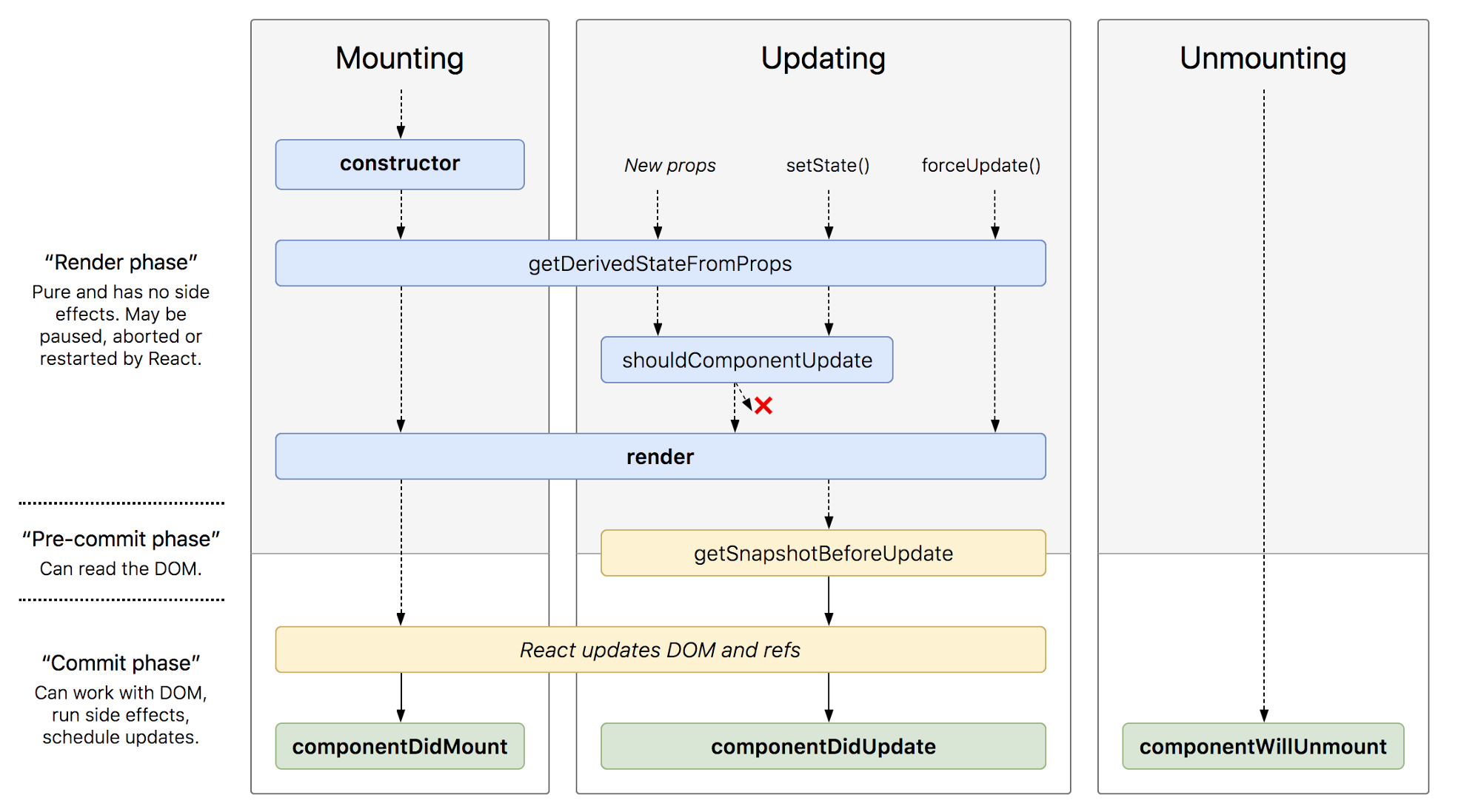
Creation and Mounting Phase
constructor(props, context)
-> static getDerivedStateFromProps()
-> render()
-> componentDidMount().
Updating Phase
Update for three reasons:
- Parent/top components (re-)rendering.
this.setState()called.this.forceUpdate()called.
static getDerivedStateFromProps()
-> shouldComponentUpdate(nextProps, nextState)
-> render()
-> getSnapshotBeforeUpdate()
-> componentDidUpdate(prevProps, prevState).
getSnapshotBeforeUpdate():
在最新的渲染输出提交给 DOM 前将会立即调用,
这对于从 DOM 捕获信息(比如:滚动位置)很有用.
Unmounting Phase
componentWillUnmount().
Error Handling Phase
static getDerivedStateFromError()
-> componentDidCatch().
Render Function
- Default render behavior (without any
memo/useMemo/PureComponent): when a parent component renders, React will recursively render all child components inside of it (becauseprops.childrenis always a new reference when parent re-rendering). - Render logic:
- Can't mutate existing variables and objects.
- Can't create random values like
Math.random()orDate.now(). - Can't make network requests.
- Can't queue state updates.
React Element API
React Clone Element API
Modify children properties:
function CreateTextWithProps({
  text,
  ASCIIChar,
  ...props
}: {
  text: string
  ASCIIChar: string
}) {
  return (
    <span {...props}>
      {text}
      {ASCIIChar}
    </span>
  )
}

function RepeatCharacters({ times, children }) {
  return React.cloneElement(children, {
    ASCIIChar: children.props.ASCIIChar.repeat(times),
  })
}

export default function App() {
  return (
    <div>
      <RepeatCharacters times={3}>
        <CreateTextWithProps text="Foo Text" ASCIIChar="." />
      </RepeatCharacters>
    </div>
  )
}
function RadioGroup({
  name,
  children,
}: {
  name: string
  children: ReactElement
}) {
  const RenderChildren = () =>
    React.Children.map(children, (child) => {
      return React.cloneElement(child, {
        name,
      })
    })

  return (
    <div>
      <RenderChildren />
    </div>
  )
}

function RadioButton({
  value,
  name,
  children,
}: {
  value: string
  name: string
  children: ReactElement
}) {
  return (
    <label>
      <input type="radio" value={value} name={name} />
      {children}
    </label>
  )
}

export default function App() {
  return (
    <RadioGroup name="numbers">
      <RadioButton value="first">First</RadioButton>
      <RadioButton value="second">Second</RadioButton>
      <RadioButton value="third">Third</RadioButton>
    </RadioGroup>
  )
}
React Children API
React.Children.toArray(children).React.Children.forEach(children, fn).React.Children.map(children, fn).React.Children.count(children).React.Children.only(children).
import { Children, cloneElement } from 'react'

function Breadcrumbs({ children }: { children: ReactElement }) {
  const arrayChildren = Children.toArray(children)

  return (
    <ul
      style={{
        listStyle: 'none',
        display: 'flex',
      }}
    >
      {Children.map(arrayChildren, (child, index) => {
        const isLast = index === arrayChildren.length - 1

        if (!isLast && !child.props.link) {
          throw new Error(
            `BreadcrumbItem child no. ${index + 1}
            should be passed a 'link' prop`,
          )
        }

        return (
          <>
            {child.props.link
              ? (
                  <a
                    href={child.props.link}
                    style={{
                      display: 'inline-block',
                      textDecoration: 'none',
                    }}
                  >
                    <div style={{ marginRight: '5px' }}>
                      {cloneElement(child, {
                        isLast,
                      })}
                    </div>
                  </a>
                )
              : (
                  <div style={{ marginRight: '5px' }}>
                    {cloneElement(child, {
                      isLast,
                    })}
                  </div>
                )}
            {!isLast && <div style={{ marginRight: '5px' }}></div>}
          </>
        )
      })}
    </ul>
  )
}

function BreadcrumbItem({
  isLast,
  children,
}: {
  isLast: boolean
  children: ReactElement
}) {
  return (
    <li
      style={{
        color: isLast ? 'black' : 'blue',
      }}
    >
      {children}
    </li>
  )
}

export default function App() {
  return (
    <Breadcrumbs>
      <BreadcrumbItem link="https://example.com/">Example</BreadcrumbItem>
      <BreadcrumbItem link="https://example.com/hotels/">Hotels</BreadcrumbItem>
      <BreadcrumbItem>A Fancy Hotel Name</BreadcrumbItem>
    </Breadcrumbs>
  )
}
Compound Components
Compound components example:
import * as React from 'react'

interface Props {
  onStateChange?: (e: string) => void
  defaultValue?: string
}

interface State {
  currentValue: string
  defaultValue?: string
}

interface RadioInputProps {
  label: string
  value: string
  name: string
  imgSrc: string
  key: string | number
  currentValue?: string
  onChange?: (e: React.ChangeEvent<HTMLInputElement>) => void
}

function RadioImageForm({
  children,
  onStateChange,
  defaultValue,
}: React.PropsWithChildren<Props>): React.ReactElement {
  const [state, setState] = React.useState<State>({
    currentValue: '',
    defaultValue,
  })

  // Memoized so that providerState isn't recreated on each render
  const providerState = React.useMemo(
    () => ({
      onChange: (event: React.ChangeEvent<HTMLInputElement>): void => {
        const value = event.target.value
        setState({
          currentValue: value,
        })
        onStateChange?.(value)
      },
      ...state,
    }),
    [state, onStateChange],
  )

  return (
    <div>
      <form>
        {React.Children.map(children, (child: React.ReactElement) =>
          React.cloneElement(child, {
            ...providerState,
          }),)}
      </form>
    </div>
  )
}

function RadioInput({
  currentValue,
  onChange,
  label,
  value,
  name,
  imgSrc,
  key,
}: RadioInputProps): React.ReactElement {
  return (
    <label className="radio-button-group" key={key}>
      <input
        type="radio"
        name={name}
        value={value}
        aria-label={label}
        onChange={onChange}
        checked={currentValue === value}
        aria-checked={currentValue === value}
      />
      <img alt="" src={imgSrc} />
    </label>
  )
}

RadioImageForm.RadioInput = RadioInput

export default RadioImageForm
- Compound components manage their own internal state, which they share among several child components.
- When importing a compound component, automatically import child components available on compound component.
import type { CSSProperties, ReactNode } from 'react'

interface Props {
  children: ReactNode
  style?: CSSProperties
  rest?: any
}

function Header({ children, style, ...rest }: Props): JSX.Element {
  return (
    <div style={{ ...style }} {...rest}>
      {children}
    </div>
  )
}

function Body({ children, style, ...rest }: Props): JSX.Element {
  return (
    <div style={{ ...style }} {...rest}>
      {children}
    </div>
  )
}

function Footer({ children, style, ...rest }: Props): JSX.Element {
  return (
    <div style={{ ...style }} {...rest}>
      {children}
    </div>
  )
}

function getChildrenOnDisplayName(children: ReactNode[], displayName: string) {
  return React.Children.map(children, child =>
    child.displayName === displayName ? child : null,)
}

function Card({ children }: { children: ReactNode[] }): JSX.Element {
  const header = getChildrenOnDisplayName(children, 'Header')
  const body = getChildrenOnDisplayName(children, 'Body')
  const footer = getChildrenOnDisplayName(children, 'Footer')

  return (
    <div className="card">
      {header && <div className="card-header">{header}</div>}
      <div className="card-body">{body}</div>
      {footer && <div className="card-footer">{footer}</div>}
    </div>
  )
}

Header.displayName = 'Header'
Body.displayName = 'Body'
Footer.displayName = 'Footer'
Card.Header = Header
Card.Body = Body
Card.Footer = Footer

function App() {
  return (
    <div>
      <Card>
        <Card.Header>Header</Card.Header>
        <Card.Body>Body</Card.Body>
        <Card.Footer>Footer</Card.Footer>
      </Card>
    </div>
  )
}

export default App