Server Components
Give React a chunk of code that it runs exclusively on the server, to do the database query to eliminate redundant network requests, polish FCP and LCP, and improve SEO:
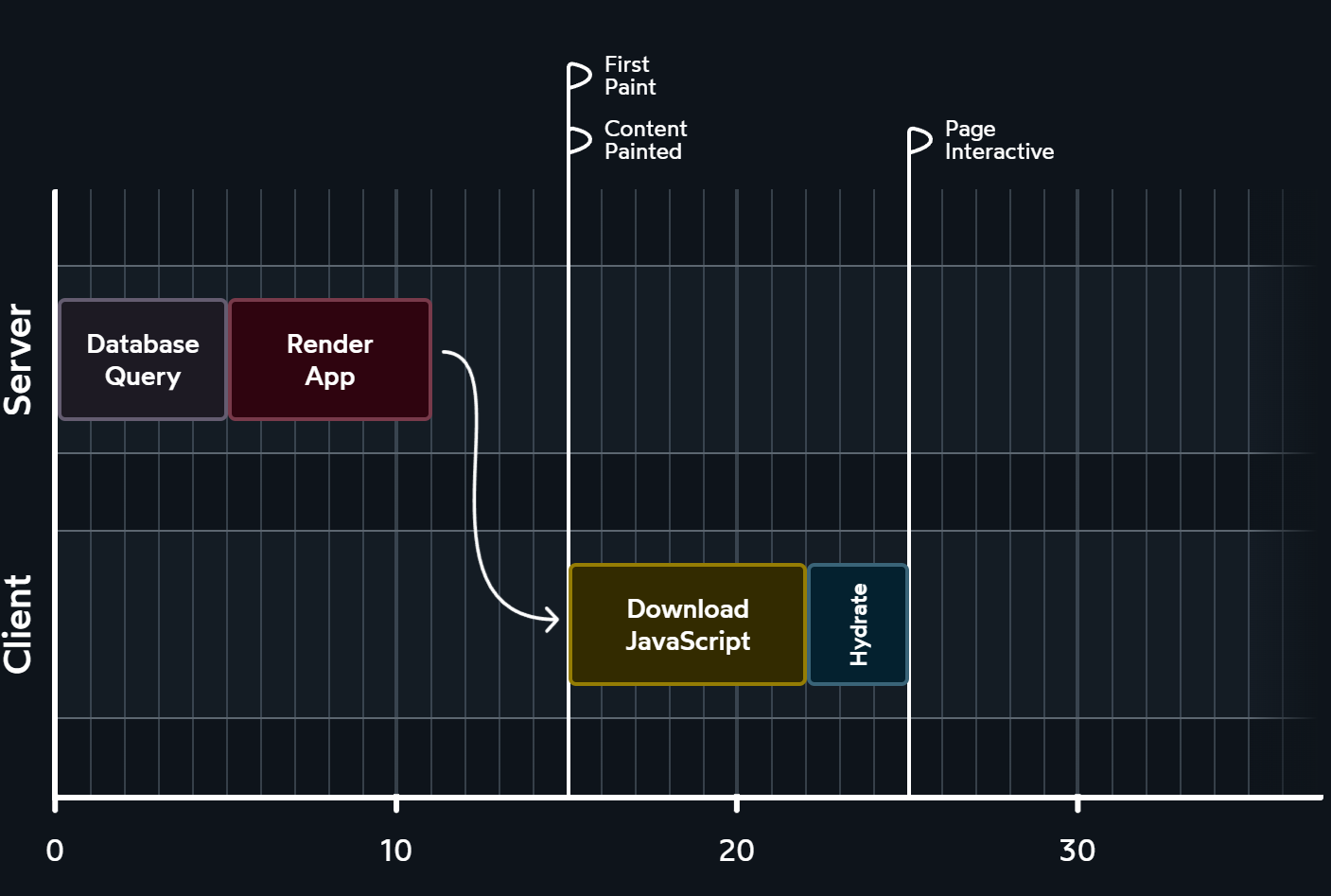
Each meta-framework came up with its own approach to achieve such target. Next.js has one approach, Gatsby has another, Remix has yet another. It hasn't been standardized.
- Next
- Remix
- Gatsby
import type { PageProps } from '@/types'
// pages/index.js
import ParentComponent from '../components/parent-component'

export default function Page({ data }: PageProps) {
  return <ParentComponent data={data} />
}

export async function getServerSideProps() {
  const response = await fetch('https://api.github.com/repos/vercel/next.js')
  const data = await response.json()

  return { props: { data } }
}
import { json } from '@remix-run/node'
// app/routes/_index.jsx
import { useLoaderData } from '@remix-run/react'
import ParentComponent from '../components/parent-component'

export default function Page() {
  const { data } = useLoaderData()

  return <ParentComponent data={data} />
}

export async function loader() {
  const response = await fetch('https://api.github.com/repos/remix-run/remix')
  const data = await response.json()

  return json({
    data,
  })
}
import type { PageProps } from '@/types'
// src/pages/index.js
import ParentComponent from '../components/parent-component'

export default function Page({ data }: PageProps) {
  return <ParentComponent data={data} />
}

export async function getServerData() {
  const response = await fetch('https://api.github.com/repos/gatsbyjs/gatsby')
  const data = await response.json()

  return { props: { data } }
}
For years, the React team has been quietly tinkering on this problem,
trying to come up with an official way to solve this problem.
Their solution is called React Server Components.
Server Components never re-render. They run once on the server to generate the UI. The rendered value is sent to the client and locked in place. As far as React is concerned, this output is immutable, and will never change:
import db from 'imaginary-db'

export default async function Homepage() {
  const link = db.connect('localhost', 'root', 'pass0w0rd')
  const data = await db.query(link, 'SELECT * FROM products')

  return (
    <div>
      <h1>Trending Products</h1>
      {data.map(item => (
        <article key={item.id}>
          <h2>{item.title}</h2>
          <p>{item.description}</p>
        </article>
      ))}
    </div>
  )
}
Code for Server Components isn't included in the JS bundle. We send the virtual representation (along the rendered value) that was generated by the server. When React loads on the client, it re-uses that description instead of re-generating it:

<!doctype html>
<html>
  <body>
    <div>
      <h1>Trending Products</h1>
      <article>
        <h2>Product 1</h2>
        <p>Description 1</p>
      </article>
      <article>
        <h2>Product 2</h2>
        <p>Description 2</p>
      </article>
    </div>

    <script src="/static/js/bundle.js"></script>
    <script>
      self.__next['$Homepage-1'] = {
        type: 'div',
        props: null,
        children: [
          {
            type: 'h1',
            props: null,
            children: ['Trending Products'],
          },
          {
            type: 'article',
            props: { key: 1 },
            children: [
              { type: 'h2', props: null, children: ['Product 1'] },
              { type: 'p', props: null, children: ['Description 1'] },
            ],
          },
          {
            type: 'article',
            props: { key: 2 },
            children: [
              { type: 'h2', props: null, children: ['Product 2'] },
              { type: 'p', props: null, children: ['Description 2'] },
            ],
          },
        ],
      }
    </script>
  </body>
</html>
RSCs:
- Addresses SEO and loading time issues in CSR.
- Improves SSR by reducing server load.
Use Client Directive
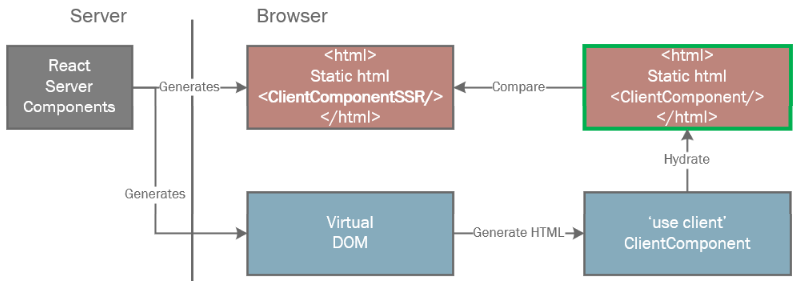
'use client' directive:
- It tells the bundler to output this code as a separate file with its own url so it can be loaded lazily in the browser.
- It tells the compiler when this code is needed, it should add code to load the js file for this component.
- It tells RSC that the Virtual DOM it generates should contain a placeholder reference to this Client Component, rather than the component's html output.
- It still runs on the server,
'use client'does not disable SSR.
React Server Components Composition Pattern
Server Components and Client Components are different:
| Features | Server | Client |
|---|---|---|
| Backend Resources | o | x |
| Server Sensitive Data | o | x |
| Event Handlers | x | o |
| State and Lifecycle Effects | x | o |
| Browser-only APIs | x | o |
Client Boundaries:
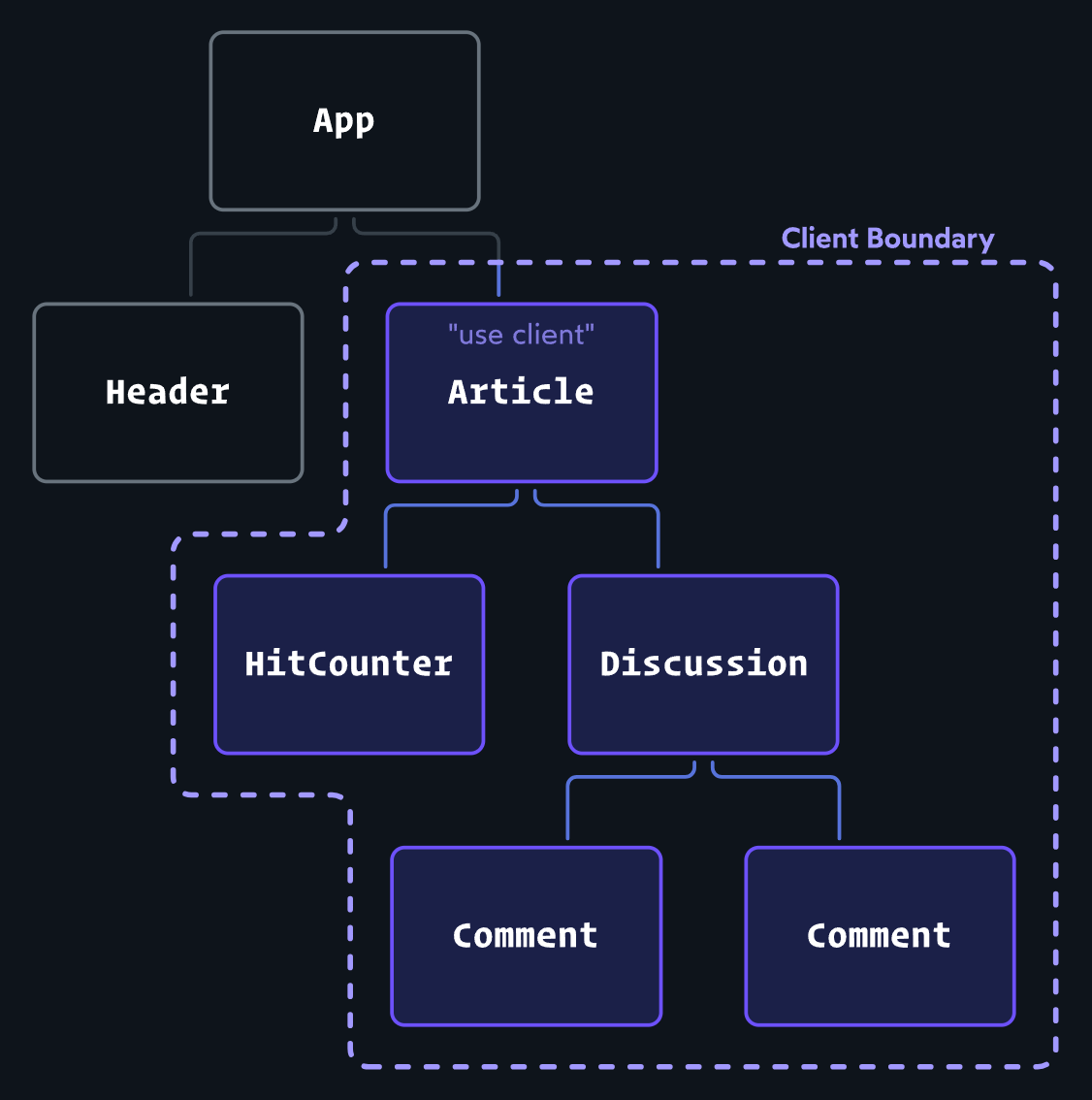
- All of components within client boundary are implicitly converted to Client Components. (Once the component became client-side, its nested components are client-side too).
- Client Components can only import other Client Components.
- Moving Client Components down the tree, to reduce Client JavaScript bundle size.
You can't import Server Components inside Client Components directly,
but can passing Server Components to Client Components as Props:
// app/ColorProvider.tsx
'use client'

import { DARK_COLORS, LIGHT_COLORS } from '@/constants'

export default function ColorProvider({
  children,
}: {
  children: React.ReactNode
}) {
  const [colorTheme, setColorTheme] = React.useState('light')
  const colorVariables = colorTheme === 'light' ? LIGHT_COLORS : DARK_COLORS

  return <body style={colorVariables}>{children}</body>
}
// app/page.tsx
import ColorProvider from './ColorProvider'
import ServerComponent from './ServerComponent'

// Pages in Next.js are Server Components by default
export default function Page() {
  return (
    <ColorProvider>
      <ServerComponent />
    </ColorProvider>
  )
}
- Wrap them into a wrapper component using
'use client'. - Library authors add
'use client'to components.
React Server Components References
- React Server Components in Next.js.
- React Server Components introduction.
- Demystifying React Server Components series.
- React Server Components devtools.