Text
Alignment
- 对 block level element 无效.
start/end/left/right/center/match-parent.justify: 自适应, 左右都无空格.
.wrap {
  text-align: justify;
  text-align-last: justify; /* 一个块或行的最后一行对齐方式 */
  /* stylelint-disable-next-line declaration-property-value-no-unknown */
  text-justify: distribute-all-lines; /* ie6-8 */
}
最后一行文字对齐方式.
- type of justification for
text-align: justify. none: turn offtext-align: justify.auto.inter-word.inter-character.
Indent
- 作用于 block container, 但实际作用于第一行内联盒子内容.
- 对
display: inline替换元素无效. - 对
display: inline-*替换元素有效. - Percentage
text-indentcalculate bycontaining blockwidth.
.hidden-text {
  font: 0/0 sans-serif;
  color: transparent;
  text-indent: -9999px;
}
pre {
  font-size: 100%;
  tab-size: 2;
  white-space: pre-wrap;
}
Spacing
在设计领域, 文本行之间的距离称为行距 (leading),
来源于印刷版每行文字之间添加的一条条的引导线 (lead).
字符之间的距离称之为字距 (tracking).
tailwind.css
使用 leading-{size} 控制 line-height,
使用 tracking-{size} 控制 letter-spacing.
letter-spacing:
- 继承性.
- 默认值为
normal. - 支持负值, 小数值.
word-spacing:
- 继承性.
- 默认值为
normal. - 支持负值, 小数值, 百分比.
- 最终间隔距离会受
text-align: justify影响.
.paragraph {
  line-height: 1.5em; /* 行间距  */
  text-indent: 2em; /* 段落缩进 */
  word-spacing: 50px; /* 词间距  */
  letter-spacing: 50px; /* 字间距  */
}
Transform
p {
  font-variant: small-caps; /* 小型的大写字母 */
  text-transform: uppercase; /* 大写字母 */
  text-transform: lowercase; /* 小写字母 */
  text-transform: capitalize; /* 首字母大写 */
}
Decoration
<'text-decoration-line'> || <'text-decoration-style'> || <'text-decoration-color'> || <'text-decoration-thickness'>.
.line {
  text-decoration-line: overline; /* 上划线 */
  text-decoration-line: line-through; /* 中划线 */
  text-decoration-line: underline; /* 下划线 */
}

.text {
  text-decoration: underline;
  text-decoration: dotted underline;
  text-decoration: red underline dashed;
  text-decoration: wavy underline 3px red;
}

.wavy {
  display: block;
  height: 0.5rem;
  padding-top: 0.5rem;
  overflow: hidden;
  letter-spacing: 100vw;
  white-space: nowrap;
}

.wavy::before {
  text-decoration: overline; /* IE */
  text-decoration-style: wavy;
  content: '\2000\2000';
}
更多下划线样式:
Emphasis
<'text-emphasis-style'> || <'text-emphasis-color'>.text-emphasis-style:none.<character>.[ filled | open ] || [ dot | circle | double-circle | triangle | sesame ].
text-emphasis-color:currentcolor | <color>.- 重点符号字号默认为文字字号的一半.
.text {
  /* Initial value */
  text-emphasis: none;

  /* <string> value */
  text-emphasis: 'x';
  text-emphasis: '点';
  text-emphasis: '\25B2';
  text-emphasis: '*' #555;

  /* Keywords value */
  text-emphasis: filled; /* filled dot */
  text-emphasis: open; /* open dot */
  text-emphasis: sesame; /* filled sesame */
  text-emphasis: open sesame;

  /* Keywords value combined with a color */
  text-emphasis: filled sesame #555;
}
[ over | under ] && [ right | left ].over: draws marks over text in horizontal writing mode.under: draws marks under text in horizontal writing mode.right: draws marks to right of text in vertical writing mode.left: draws marks to left of text in vertical writing mode.- 默认在顶部或右侧画重点符号.
.text {
  /* Initial value */
  text-emphasis-position: over right;

  /* Keywords value */
  text-emphasis-position: over left;
  text-emphasis-position: under right;
  text-emphasis-position: left under;
  text-emphasis-position: right over;
}
Size Adjust
禁止 iOS 横屏字号自动调整:
body {
  /* stylelint-disable-next-line property-no-vendor-prefix */
  -webkit-text-size-adjust: none;
}
Overflow
clip: 切除溢出部分.ellipsis: 省略号标志 (要设置width).
.truncation-article-container {
  width: 500px;
  overflow: hidden;
  text-overflow: ellipsis;
  white-space: nowrap;
}
.article-container {
  display: block;
  overflow: hidden;
  text-overflow: ellipsis;
  -webkit-line-clamp: 4; /* 需要显示的行数 */
  word-break: break-all;
  -webkit-box-orient: vertical;
}
White Space
Web default:
- 空格被解析为换行.
- 换行被解析为空格.
- 自动合并空格.
普通标签内自动忽略空格符,
并将其与空白符转换成一个空格进行输出,
可用 white-space 改变这一行为:
| White Space | 换行符 | 空格和制表符 | 文字换行 | 行尾空格 |
|---|---|---|---|---|
| normal | 合并 | 合并 | 换行 | 删除 |
| nowrap | 合并 | 合并 | 不换行 | 删除 |
| pre | 保留 | 保留 | 不换行 | 保留 |
| pre-wrap | 保留 | 保留 | 换行 | 挂起 |
| pre-line | 保留 | 合并 | 换行 | 删除 |
| break-spaces | 保留 | 保留 | 换行 | 换行 |
dd + dt::before {
  white-space: pre;
  content: '\A';
}

dd + dd::before {
  margin-left: -0.25em;
  font-weight: normal;
  content: ', ';
}
Wrap
Text wrapping and word breaking:
word-break:normal: default line break rule.keep-all: Word breaks should not be used for CJK text. Non-CJK text behavior is same as fornormal.break-all: word breaks should be inserted between any two characters (excluding CJK text).
overflow-wrap:normal.anywhere.break-word.
line-break(break lines of CJK text when working with punctuation and symbols):auto.loose.normal.strict.anywhere.
hyphens(how words should be hyphenated when text wraps across multiple lines):manual: words are broken for line-wrapping only where-or­.auto: automatically break words at appropriate hyphenation points.none: words are not broken at line breaks.
<wbr>: word break opportunity.
/* 不换行 */
.nowrap {
  white-space: nowrap;
}

/* 自动换行 */
.auto-wrap {
  hyphens: auto;
  line-break: anywhere;
  word-break: normal;
  overflow-wrap: break-word;
}

/* 自动换行 */
pre {
  hyphens: auto;
  line-break: anywhere;
  /* stylelint-disable-next-line property-no-deprecated */
  word-wrap: break-word; /* IE 5.5-7 */
  white-space: pre-wrap; /* Modern Browsers */
}

/* 强制换行 */
.force-wrap {
  line-break: anywhere;
  word-break: break-all;
}

/* IE not support <wbr> */
wbr::after {
  content: '\00200B';
}
- 避头标点: 不在行首显示的标点, e.g. 逗号, 顿号, 句号, 问号, 叹号.
- 避尾标点: 不在行尾显示的标点, e.g. 前引号, 前括号.
.text-truncate-box {
  display: inline-block;
  max-width: 250px;
  overflow: hidden;
  text-overflow: ellipsis;
  overflow-wrap: normal;
  white-space: nowrap;
}
Direction
Set direction of text, table columns, and horizontal overflow:
.ltr {
  direction: ltr;
}

.rtl {
  direction: rtl;
}
Unicode Bidi
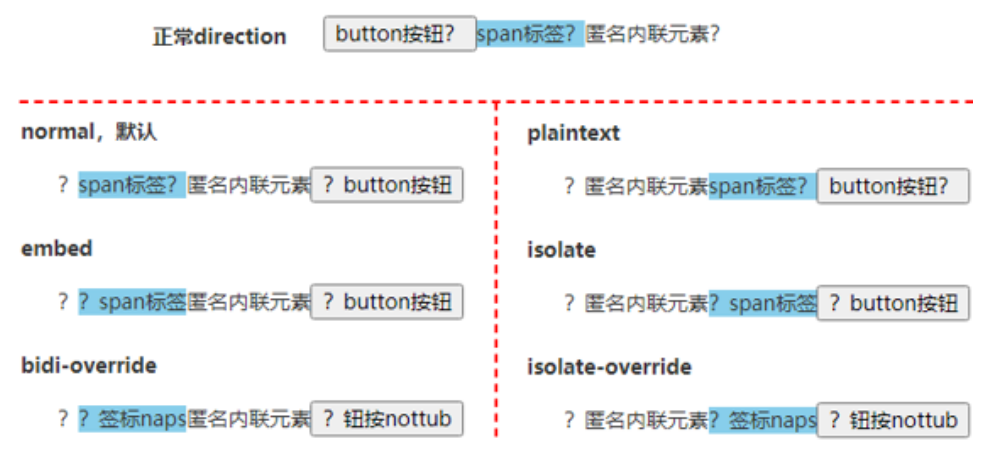
normal.plaintext: 元素内文字 LTR.embed: 中英文字符 LTR, 标点符号 RLT.isolate: 中英文字符 LTR, 标点符号 RLT.bidi-override: 所有字符 RTL.isolate-override: 所有字符 RTL.
<p><button>button按钮?</button><span>span标签?</span>匿名内联元素?</p>

<style>
  p {
    direction: rtl;
  }

  span {
    background-color: skyblue;
  }
</style>
Writing Mode
Set whether lines of text are laid out horizontally or vertically:
/* 单列展示 */
.wrap-single {
  width: 25px;
  height: auto;
  padding: 8px 5px;
  font-size: 12px;
  line-height: 18px;
  hyphens: auto;
  overflow-wrap: break-word; /* 英文自动换行 */
}

/* 多列展示 */
.wrap-multiple {
  height: 200px;
  line-height: 30px;
  text-align: justify;
  writing-mode: horizontal-tb; /* 水平排列 */
  writing-mode: vertical-lr; /* 竖直从左向右 */
  writing-mode: vertical-rl; /* 竖直从右向左 */
  writing-mode: lr-tb; /* IE: 水平排列 */
  /* stylelint-disable-next-line declaration-property-value-no-unknown */
  writing-mode: tb-lr; /* IE: 竖直从左向右 */
  writing-mode: tb-rl; /* IE: 竖直从右向左 */
}
Orientation
mixed: 中文字符正立, 英文字符旋转 90 度.upright: 中文字符正立, 英文字符正立.sideways/sideways-right: 中文字符旋转 90 度, 英文字符旋转 90 度.
Combine Upright
none.all: 横向合并所有类型字符.digits <integer>?: 横向合并数字字符.
Content
content replaces an element with a generated value:
- Objects inserted are
Anonymous Replaced Elements. - CSS-generated content is not included in the DOM,
will not be represented in
accessibility tree.
Counter
Adjust the appearance of content based on its location in a document.
/* Set a counter named 'section', and its initial value is 0. */
body {
  counter-reset: section;
}

/* Increment the value of section counter by 1 */

/* Display the value of section counter */
h3::before {
  content: counter(section);
  counter-increment: section;
}
Nested counters counters(counterName, hyphenString):
ol {
  list-style-type: none;
  counter-reset: section; /* 为每个ol元素创建新的计数器实例 */
}

li::before {
  content: counters(section, '.') ' '; /* 为所有计数器实例增加以`.`分隔的值 */
  counter-increment: section; /* 只增加计数器的当前实例 */
}
<ol>
  <li>item</li>
  <!-- 1     -->
  <li>
    item
    <!-- 2     -->
    <ol>
      <li>item</li>
      <!-- 2.1   -->
      <li>item</li>
      <!-- 2.2   -->
      <li>
        item
        <!-- 2.3   -->
        <ol>
          <li>item</li>
          <!-- 2.3.1 -->
          <li>item</li>
          <!-- 2.3.2 -->
        </ol>
        <ol>
          <li>item</li>
          <!-- 2.3.1 -->
          <li>item</li>
          <!-- 2.3.2 -->
          <li>item</li>
          <!-- 2.3.3 -->
        </ol>
      </li>
      <li>item</li>
      <!-- 2.4   -->
    </ol>
  </li>
  <li>item</li>
  <!-- 3     -->
  <li>item</li>
  <!-- 4     -->
</ol>
<ol>
  <li>item</li>
  <!-- 1     -->
  <li>item</li>
  <!-- 2     -->
</ol>