Display
Table
table-layout: fixedto contain cells with same width, makes<table>behave a bit more predictably.border: 0andborder-collapse: collapseto remove border line.text-alignfor<th>/<td>text alignment.- Implement filter or pagination with
display: noneapplied to<tr>.
/**
 * `fixed` layout and `collapse` border.
 */
table {
  width: 100%;
  table-layout: fixed;
  border-collapse: collapse;
  border: 3px solid purple;
}

/**
 * Spacing and alignment.
 */
th,
td {
  padding: 12px 15px;
  text-align: left;
  border-bottom: 1px solid #e1e1e1;
}

th:first-child,
td:first-child {
  padding-left: 0;
}

th:last-child,
td:last-child {
  padding-right: 0;
}

/**
 * Control column width.
 */
thead th:nth-child(1) {
  width: 30%;
}

thead th:nth-child(2) {
  width: 20%;
}

thead th:nth-child(3) {
  width: 15%;
}

thead th:nth-child(4) {
  width: 35%;
}
TreeView
GitHub tree view component:
<div class="tree-view-item">
  <div class="spacer"></div>
  <div class="toggle"></div>
  <div class="content">
    <div class="visual"></div>
    <span class="text">ReactART-test.js.snap</span>
  </div>
</div>

<style scoped>
  .tree-view-item {
    --toggle-width: 1rem;
    --spacer-col: calc(calc(var(--level) - 1) * (var(--toggle-width) / 2));

    display: grid;
    grid-template-areas: 'spacer toggle content';
    grid-template-columns: var(--spacer-col) var(--toggle-width) 1fr;
  }

  .spacer {
    grid-area: spacer;
  }

  .toggle {
    grid-area: toggle;
  }

  .content {
    grid-area: content;
  }
</style>
Slide
锚点定位本质上改变了 scrollTop 或 scrollLeft 值,
即使容器设置 overflow: hidden 也会发生滚动,
可以利用锚点定位实现 CSS-only slides:
position: absoluteto stack slides up.id+:targetfor style current slide (change z-index).- Add animation to slide change: (prev, current, next)
.slide,.slide:target,.slide:target ~ slide. - Add
overflow: hiddento container when animation.
<main>
  <section class="slide" id="slide1">
    <a class="slide-link" href="#slide2">next</a>
  </section>
  <section class="slide" id="slide2">
    <a class="slide-link" href="#slide1">prev</a>
    <a class="slide-link" href="#slide3">next</a>
  </section>
  <section class="slide" id="slide3">
    <a class="slide-link" href="#slide2">prev</a>
    <a class="slide-link" href="#slide4">next</a>
  </section>
  <section class="slide" id="slide4">
    <a class="slide-link" href="#slide3">prev</a>
    <a class="slide-link" href="#slide5">next</a>
  </section>
  <section class="slide" id="slide5">
    <a class="slide-link" href="#slide4">prev</a>
  </section>
</main>
body {
  overflow: hidden; /* key 1 */
}

.slide {
  position: absolute; /* key 2 */
  z-index: 0; /* key 3 */
  box-sizing: border-box;
  width: 100%;
  height: 100vh;
}

.slide:target {
  z-index: 1; /* key 4 */
}
/* Rotate Fade-In Animation */
@media only screen and (prefers-reduced-motion: reduce) {
  .slide {
    transition: none;
  }
}

.slide {
  z-index: 0;
  transform: rotate(90deg);
  transform-origin: 0 0;
  transition:
    transform 1s,
    opacity 0.8s;
}

.slide:target {
  z-index: 1;
  transform: rotate(0deg);
}

.slide:target ~ section {
  opacity: 0;
  transform: rotate(-90deg);
}
当两个 width: 100% slide 同时处于同一水平位置,
添加左进/右进动画, 当 slide 向右滑动时,
水平的 scrollX 会直接滑到最右边,
导致幻灯片浏览异常.
解决办法
如下:
function resetScrollX() {
  window.scrollTo(0, 0)
}
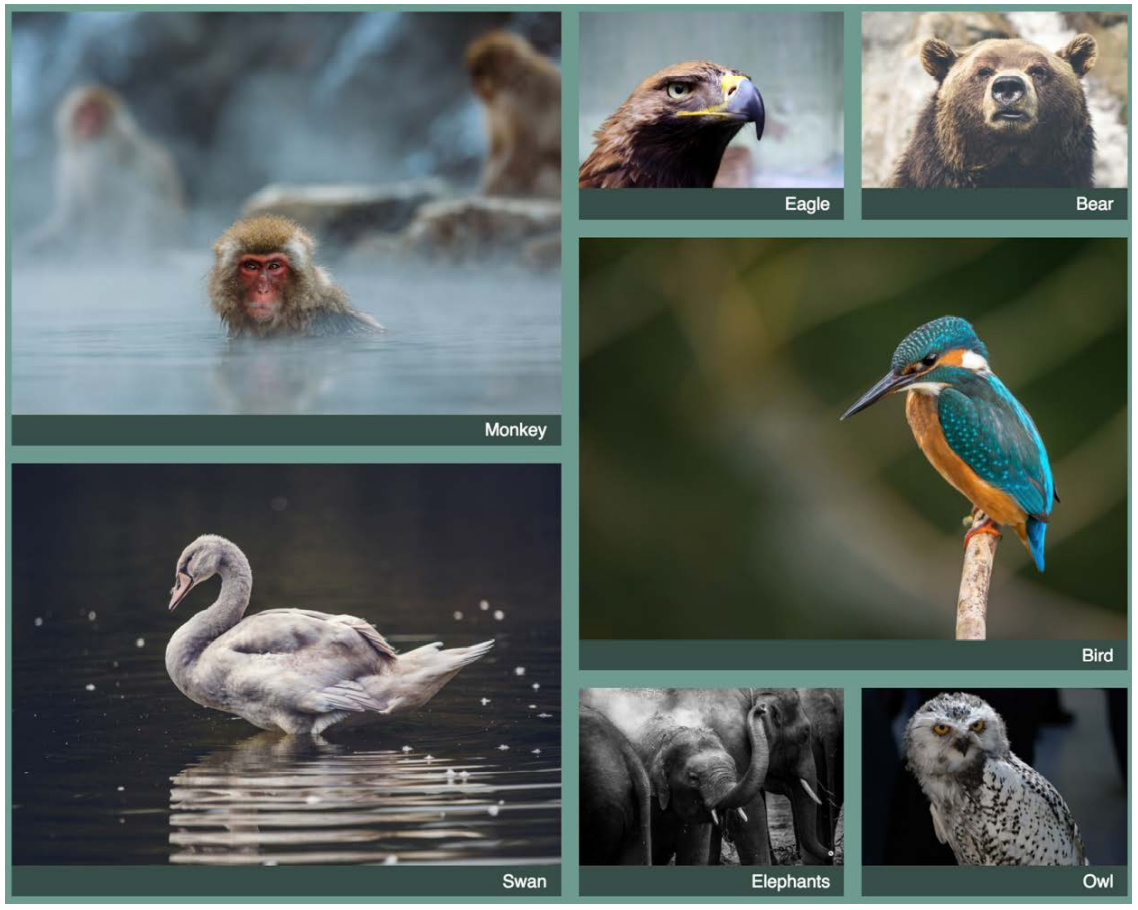
Gallery
.gallery {
  display: grid;
  grid-template-columns: repeat(auto-fill, minmax(200px, 1fr));
  grid-auto-rows: 1fr;
  grid-auto-flow: dense;
  gap: 1em;
}

.gallery .featured {
  grid-row: span 2;
  grid-column: span 2;
}

.gallery figure {
  display: flex;
  flex-direction: column;
  margin: 0;
}

.gallery img {
  flex: 1;
  max-width: 100%;
  object-fit: cover;
}
Timeline and Steps
Use pseudo elements to construct circle and line:
/* The separator line */
.c-timeline-item:not(:last-child) .c-timeline-content::before {
  position: absolute;
  top: 0;
  right: 100%;
  width: 2px;
  height: 100%;
  content: '';
  background-color: #d3d3d3;
}

/* The circle */
.c-timeline-content::after {
  position: absolute;
  top: 0;
  left: -12px;
  z-index: 1;
  width: 20px;
  height: 20px;
  content: '';
  background-color: #fff;
  border: 2px solid #d3d3d3;
  border-radius: 50%;
}